Vibe Coding: "a software development approach where you use plain language prompts to direct an AI to write, debug, and build applications while you focus purely on the high-level goals and creative vision" – IBM
I wanted to experiment with vibe coding. I've used AI before to help troubleshoot issues, set up basic projects, and handle repeatable tasks — things like putting a column of data into an array, or going through several HTML pages to swap out the same bit of code. But I hadn't really tried letting AI drive a whole project before.
For this one, I picked a programming language I already knew, so I could actually keep an eye on how it was working and update the code myself when needed.
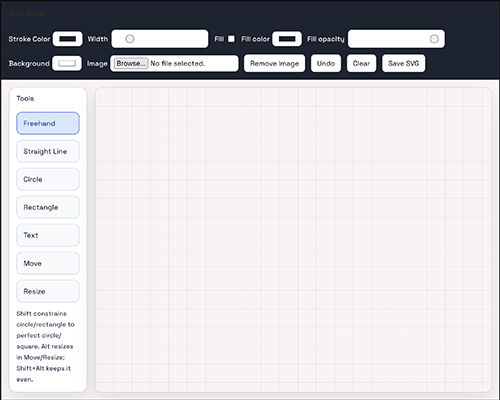
To land on a project idea, I looked through some lists of suggested practice apps and landed on a basic drawing app. From there, I came up with a few requirements:
- Vanilla JavaScript with client-side rendering, so I could add it to my website
- Needed to save the file as an SVG
- Basic drawing — lines, a few shapes, and the ability to fill them
- Ability to add a background color of the user's choice
- Ability to upload an image as the background, so people could draw on top of it
- Whatever else I could sneak in before I ran out of free tokens in Copilot
I gave Copilot a basic prompt covering the first two bullet points just to see what it would come up with. Then I added the third, which took a fair amount of back-and-forth to get working correctly. The fourth bullet came together great on the very first prompt. The fifth one worked too, but it broke the grid background — a few more rounds of back-and-forth, plus some manual tweaking on my end, finally got it working.
Along the way I also added:
- A type tool — originally you had to type your text first and then click where you wanted it placed, so I changed it so you click first and then type right on the screen
- A formatting toolbar for the text tool
- A move tool that doubles as a select tool, letting you change the fill and stroke color of an object
- A resize tool — this one's still a bit finicky. It resizes faster (bigger or smaller) than you'd expect, so it's hard to get precise control.
By this point, I'd already hit the "90% of your monthly tokens used" warning.
A few things I learned — or want to plan better for next time:
- Put together better project documentation upfront, and let the AI know from the start exactly what we're building
- Be as precise as possible when writing prompts, and reread them thinking about how else they could be interpreted
- When I'm not sure exactly what I want, start with the basic idea and build from there
Next month, I'll tackle another JavaScript app using what I learned here, and see if I can clean up the process with fewer hiccups along the way.
Git Link: https://github.com/amacher/svg_draw
Link to App page: https://www.lynnamacher.com/svg-draw/

